Platform Updates
Changelog
New updates and improvements to SignalFlare's platform.
n.v0.99

Working with SignalFlare now happens in one place. Your reports, your files, and the work our team does alongside you all live in Navigator, behind a single sign-in — plus 100+ improvements to the performance, speed, and experience of the app. We wrote separately about why the workspace matters more than any one feature in it: One workspace for your decisions.
Your chats, projects, and data carried over automatically. There's nothing to migrate and nothing to set up.
Reports
Your reports now run inside Navigator. Same reports, same numbers, no separate portal to sign into. There's a browsable catalog to find what you need, and you can link straight to a specific report and land back on it later.
Files
Files is an org-wide file explorer, now inside Navigator. Upload a whole folder at once, and preview PDFs, spreadsheets, images, and video without downloading anything first.
Chat
The composer takes file attachments. When the assistant produces something substantial, like a table or a document, it opens beside the conversation instead of scrolling past in the thread.
If you refresh the page or your browser crashes mid-answer, nothing is lost. The conversation picks up where it left off, in every tab you have open. The assistant can also run code in a cloud workspace when a question needs real computation behind it.
A faster workspace
Navigator is faster to move around in. Press ⌘K to jump to any team, project, or action. The sidebar collapses when you want the room. Themes follow light, dark, or whatever your system is set to.
There are also back and forward buttons for chats, an Org → Team → Project → Thread trail in the header, and an org switcher up top if you work across more than one account.
Working from your data
Navigator is starting to answer from your actual business data.
You can bring in your store locations as a file, map your columns to the standard schema, and get them validated on upload and on every edit after that. You can also see every semantic model your account has access to — the parts of the restaurant ontology your data is modeled in — so it's clear what Navigator can draw on when you ask it something. The assistant can search that catalog and inspect tables. It's read-only, so it can't change anything.
Smaller things
Files Navigator generates for you, like an Excel export, land in a context folder you can open from the chat page.
One click exports a summary of everything done in a Project.
Project context now travels with every message you send, so it can hold standing instructions and not just background.
Drag the timeline scrubber to jump to any point in a long conversation.
Members, settings, and access controls sit in the top right at every level.
During the transition
app.signalflare.ai stays available for now. Some older Navigator links point to pages that have since moved and will drop you on Home instead, so it's worth re-bookmarking the ones you use daily.
N.v0.2.3
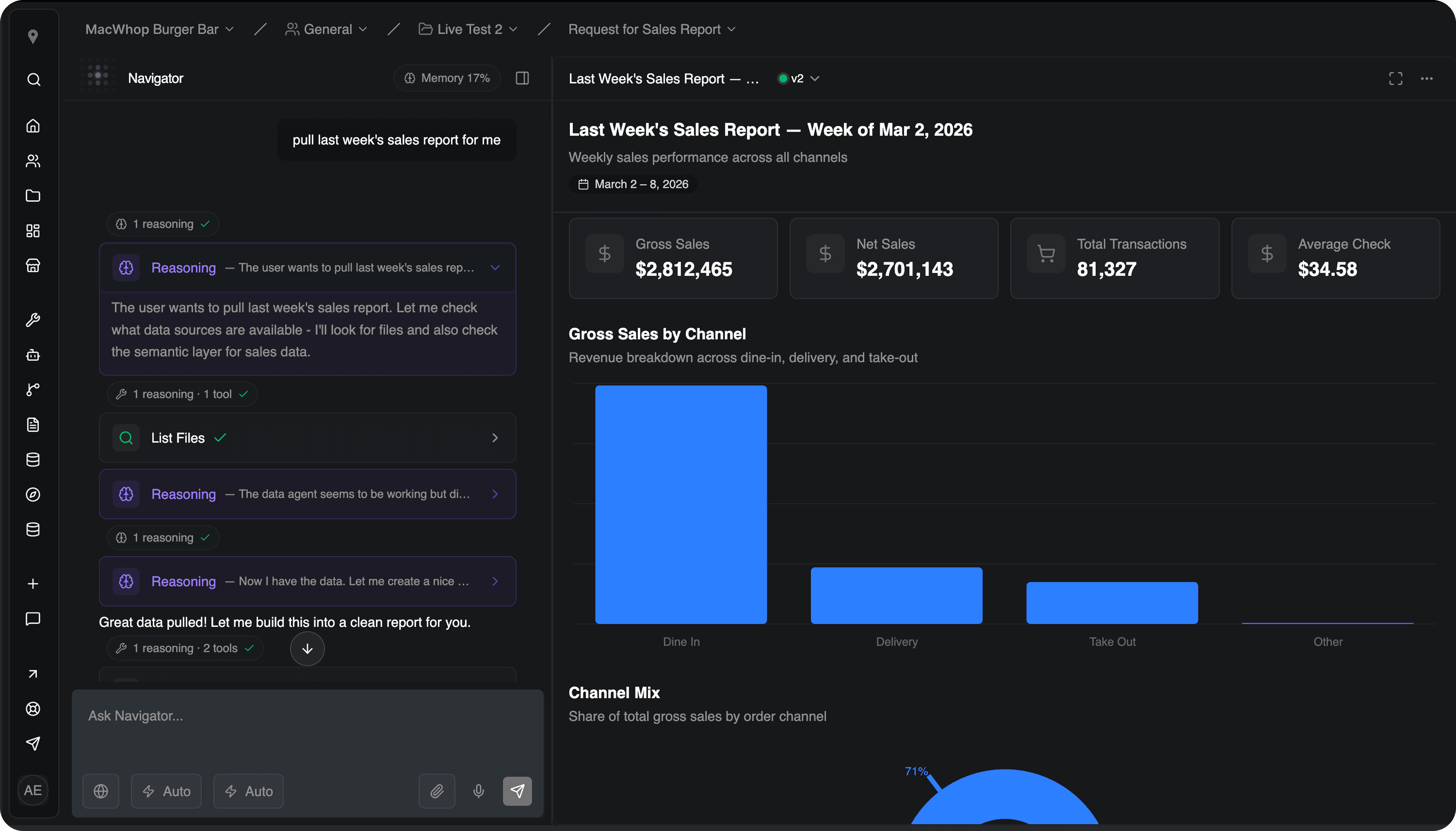
Navigator now speaks to SignalFlare's restaurant ontology
Navigator's analytical foundation took a major step forward this cycle. Our transactional and product mix semantic models are now live, connecting Navigator directly to SignalFlare's restaurant-specific intelligence — the same ontology our analysts use.
This means Navigator isn't guessing at how to interpret your data. It already knows what "menu mix" means, how dayparts are defined, what a transaction looks like across channels, and how trade area metrics relate to store performance. They encode how the data should be interpreted, what caveats apply, and what level of granularity is reliable. Navigator generates precise queries against this foundation rather than relying on a language model to improvise.
What this unlocks — example prompts Enterprise customers can try today:
Category | Use case |
|---|---|
Menu & product performance |
|
Check & transaction analytics |
|
Sales & channels |
|
Trade area & neighborhood intelligence |
|
New context management in projects
Every project now has a context panel showing all connected data sources, semantic models, uploaded files, and generated artifacts in one place. You can see exactly what Navigator has access to, what each model covers, and download any file directly.
A new file explorer supports drag-and-drop uploads, renaming, and organizing project files. Artifacts — charts, tables, and analyses Navigator creates during your conversations — now open in a full-screen viewer where you can copy, download, or share them.
Introducing hierarchical memory
Navigator now retains context across conversations within a project — your store portfolio, your definitions, the analyses you've already run. Instead of re-explaining your business every session, Navigator carries forward what it has learned.
This is structured memory, not just conversation history. It's the foundation for team-level and org-level memory, where Navigator will understand your vocabulary, your metrics, and your strategic priorities across every user and every project.
Team collaboration and sharing
Navigator is now built for teams, not just individual users.
Projects can be filtered by status: Active, Completed, or Archived.
Shared projects. All chats within a project are visible to team members. Work privately first, then move a project to a shared team when you're ready — everyone on the destination team gets access. Insights don't live in one person's chat history anymore.
Invite your team. Add teammates to your Navigator workspace and organize them across teams aligned to how your organization works — marketing, finance, operations, or by brand. Each team can have its own projects and data access.
Download anything. Data sources, uploaded files, and artifacts can all be downloaded directly from the project context panel. No more asking someone to email you the export.
nv0.2.1
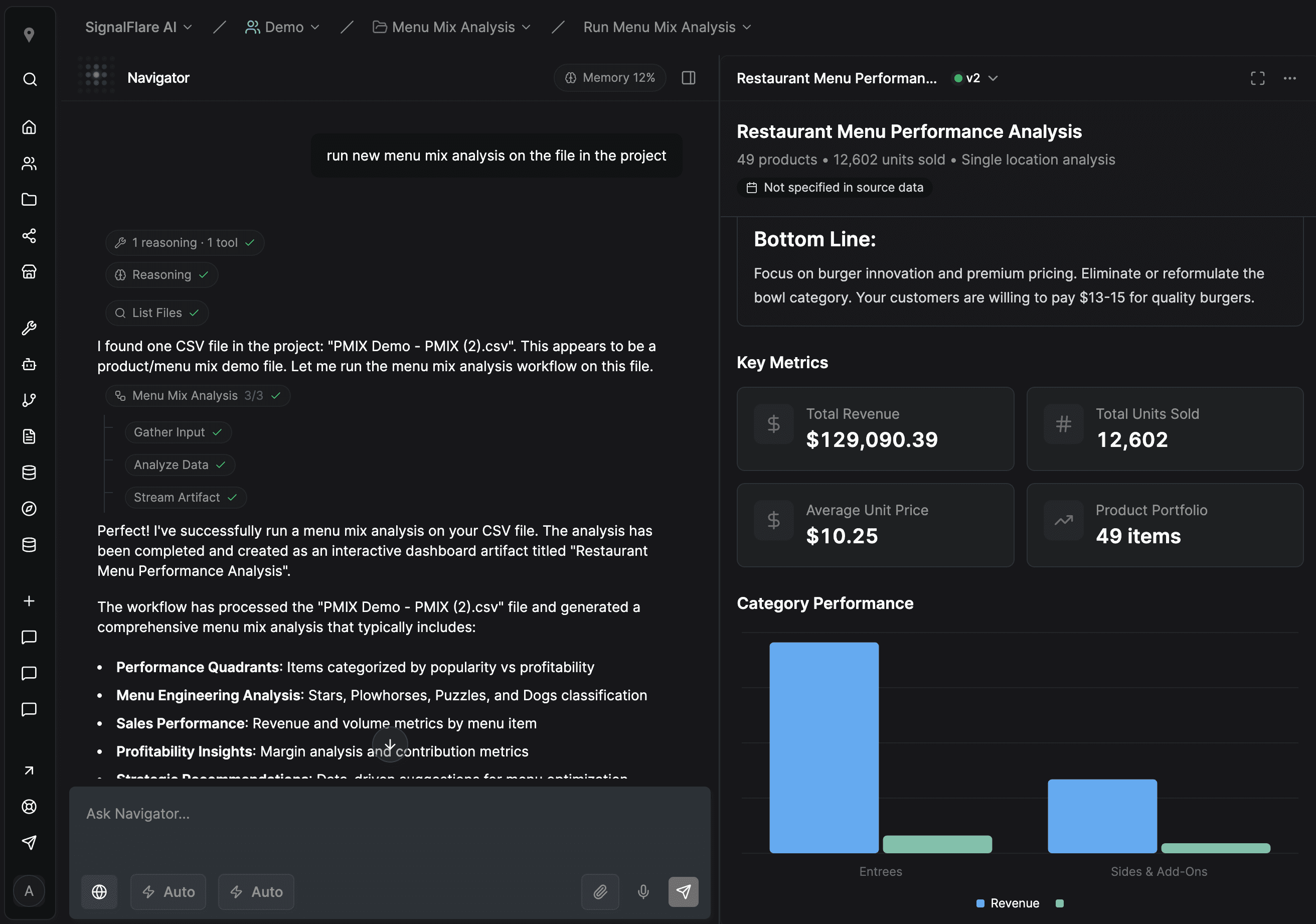
What's New
Performance & Reliability
Navigator is now faster and more reliable across the board.
New capabilities:
New Domain — Navigator now lives at navigator.signalflare.ai. All existing links redirect automatically.
Reliable File Uploads — PDF and document uploads now process in the background with automatic retry on failure. Upload your files and keep working — Navigator handles the rest.
Faster Overall Response — We've optimized background processes throughout the application. You'll notice snappier response times when navigating between pages and loading data.
Personalization Settings
Take control of how Navigator displays information and where it starts you each day.
New capabilities:
Reasoning Style Control — Choose between minimal or default display for how Navigator shows its thinking process. Find the balance that works for your workflow.
Tool Display Preferences — Customize how Navigator displays tool invocations inline. Keep your chat clean or see full details — your choice.
Default Workspace Selection — Set your default team and project so Navigator starts you exactly where you want to be when using homepage chat starters.
Access these settings under Account → Settings → General.
Artifact Sharing
Share insights and analyses directly with your team.
New capabilities:
Share with Team Members — Click the share button on any artifact to select team members who should have access. Perfect for circulating reports, analyses, or strategic recommendations.
Artifacts Hub — New dedicated page at navigator.signalflare.ai/artifacts showing everything shared with you and everything you've shared with others.
Seamless Access — Shared artifacts open directly in Navigator. Your team sees the same analysis, charts, and context you created.
This makes collaboration natural. Generate an analysis, share it with your team, and everyone works from the same foundation.
Data Model Builder (Technical Users)
For teams and developers who want to connect Navigator to their own data sources, we will be opening up access to the semantic model builder soon.
What this enables:
Connect Your Data — Map your internal data structures so Navigator can understand and query them conversationally.
Define Relationships — Set up how your datasets connect—reviews to stores, stores to transactions, locations to trade areas, products to categories.
Natural Language Queries — Once your model is built, ask questions in plain English and Navigator translates them into accurate queries against your data.
This is infrastructure for builders. If you're interested in connecting Navigator to proprietary datasets, reach out today so that we can begin innovating together. This requires thoughtful data architecture work, but the result is conversational access to any data source your or your customers rely on.
What's Coming Soon
We're building Navigator to solve the problems that matter—not just to demo well, but to work reliably when you need answers.
Intelligence That Actually Knows Restaurants
Navigator will soon understand your data the way an expert analyst does—combining the precision of mathematics with the judgment of domain expertise. Ask questions about your business, and get answers that connect the numbers to what they actually mean for your concept. No SQL. No dashboards. Just intelligence that works.
Memory That Mirrors How You Work
Navigator will remember the context that matters—your stores, your markets, the analyses you've already done. Not buried in conversation history, but structured the way your business actually operates. You won't start from scratch every time.
Collaboration Built for Strategic Work
Share insights and analyses directly with your team. Work from the same foundation, with the same context. The knowledge stays in the system instead of walking out the door when someone leaves.
These aren't features we're bolting on. They're the foundation we're building Navigator on—infrastructure that lasts, not infrastructure that fails when you scale.
n.v0.99
Working with SignalFlare now happens in one place. Your reports, your files, and the work our team does alongside you all live in Navigator, behind a single sign-in — plus 100+ improvements to the performance, speed, and experience of the app. We wrote separately about why the workspace matters more than any one feature in it: One workspace for your decisions.
Your chats, projects, and data carried over automatically. There's nothing to migrate and nothing to set up.
Reports
Your reports now run inside Navigator. Same reports, same numbers, no separate portal to sign into. There's a browsable catalog to find what you need, and you can link straight to a specific report and land back on it later.
Files
Files is an org-wide file explorer, now inside Navigator. Upload a whole folder at once, and preview PDFs, spreadsheets, images, and video without downloading anything first.
Chat
The composer takes file attachments. When the assistant produces something substantial, like a table or a document, it opens beside the conversation instead of scrolling past in the thread.
If you refresh the page or your browser crashes mid-answer, nothing is lost. The conversation picks up where it left off, in every tab you have open. The assistant can also run code in a cloud workspace when a question needs real computation behind it.
A faster workspace
Navigator is faster to move around in. Press ⌘K to jump to any team, project, or action. The sidebar collapses when you want the room. Themes follow light, dark, or whatever your system is set to.
There are also back and forward buttons for chats, an Org → Team → Project → Thread trail in the header, and an org switcher up top if you work across more than one account.
Working from your data
Navigator is starting to answer from your actual business data.
You can bring in your store locations as a file, map your columns to the standard schema, and get them validated on upload and on every edit after that. You can also see every semantic model your account has access to — the parts of the restaurant ontology your data is modeled in — so it's clear what Navigator can draw on when you ask it something. The assistant can search that catalog and inspect tables. It's read-only, so it can't change anything.
Smaller things
Files Navigator generates for you, like an Excel export, land in a context folder you can open from the chat page.
One click exports a summary of everything done in a Project.
Project context now travels with every message you send, so it can hold standing instructions and not just background.
Drag the timeline scrubber to jump to any point in a long conversation.
Members, settings, and access controls sit in the top right at every level.
During the transition
app.signalflare.ai stays available for now. Some older Navigator links point to pages that have since moved and will drop you on Home instead, so it's worth re-bookmarking the ones you use daily.
N.v0.2.3
Navigator now speaks to SignalFlare's restaurant ontology
Navigator's analytical foundation took a major step forward this cycle. Our transactional and product mix semantic models are now live, connecting Navigator directly to SignalFlare's restaurant-specific intelligence — the same ontology our analysts use.
This means Navigator isn't guessing at how to interpret your data. It already knows what "menu mix" means, how dayparts are defined, what a transaction looks like across channels, and how trade area metrics relate to store performance. They encode how the data should be interpreted, what caveats apply, and what level of granularity is reliable. Navigator generates precise queries against this foundation rather than relying on a language model to improvise.
What this unlocks — example prompts Enterprise customers can try today:
Category | Use case |
|---|---|
Menu & product performance |
|
Check & transaction analytics |
|
Sales & channels |
|
Trade area & neighborhood intelligence |
|
New context management in projects
Every project now has a context panel showing all connected data sources, semantic models, uploaded files, and generated artifacts in one place. You can see exactly what Navigator has access to, what each model covers, and download any file directly.
A new file explorer supports drag-and-drop uploads, renaming, and organizing project files. Artifacts — charts, tables, and analyses Navigator creates during your conversations — now open in a full-screen viewer where you can copy, download, or share them.
Introducing hierarchical memory
Navigator now retains context across conversations within a project — your store portfolio, your definitions, the analyses you've already run. Instead of re-explaining your business every session, Navigator carries forward what it has learned.
This is structured memory, not just conversation history. It's the foundation for team-level and org-level memory, where Navigator will understand your vocabulary, your metrics, and your strategic priorities across every user and every project.
Team collaboration and sharing
Navigator is now built for teams, not just individual users.
Projects can be filtered by status: Active, Completed, or Archived.
Shared projects. All chats within a project are visible to team members. Work privately first, then move a project to a shared team when you're ready — everyone on the destination team gets access. Insights don't live in one person's chat history anymore.
Invite your team. Add teammates to your Navigator workspace and organize them across teams aligned to how your organization works — marketing, finance, operations, or by brand. Each team can have its own projects and data access.
Download anything. Data sources, uploaded files, and artifacts can all be downloaded directly from the project context panel. No more asking someone to email you the export.
nv0.2.1
What's New
Performance & Reliability
Navigator is now faster and more reliable across the board.
New capabilities:
New Domain — Navigator now lives at navigator.signalflare.ai. All existing links redirect automatically.
Reliable File Uploads — PDF and document uploads now process in the background with automatic retry on failure. Upload your files and keep working — Navigator handles the rest.
Faster Overall Response — We've optimized background processes throughout the application. You'll notice snappier response times when navigating between pages and loading data.
Personalization Settings
Take control of how Navigator displays information and where it starts you each day.
New capabilities:
Reasoning Style Control — Choose between minimal or default display for how Navigator shows its thinking process. Find the balance that works for your workflow.
Tool Display Preferences — Customize how Navigator displays tool invocations inline. Keep your chat clean or see full details — your choice.
Default Workspace Selection — Set your default team and project so Navigator starts you exactly where you want to be when using homepage chat starters.
Access these settings under Account → Settings → General.
Artifact Sharing
Share insights and analyses directly with your team.
New capabilities:
Share with Team Members — Click the share button on any artifact to select team members who should have access. Perfect for circulating reports, analyses, or strategic recommendations.
Artifacts Hub — New dedicated page at navigator.signalflare.ai/artifacts showing everything shared with you and everything you've shared with others.
Seamless Access — Shared artifacts open directly in Navigator. Your team sees the same analysis, charts, and context you created.
This makes collaboration natural. Generate an analysis, share it with your team, and everyone works from the same foundation.
Data Model Builder (Technical Users)
For teams and developers who want to connect Navigator to their own data sources, we will be opening up access to the semantic model builder soon.
What this enables:
Connect Your Data — Map your internal data structures so Navigator can understand and query them conversationally.
Define Relationships — Set up how your datasets connect—reviews to stores, stores to transactions, locations to trade areas, products to categories.
Natural Language Queries — Once your model is built, ask questions in plain English and Navigator translates them into accurate queries against your data.
This is infrastructure for builders. If you're interested in connecting Navigator to proprietary datasets, reach out today so that we can begin innovating together. This requires thoughtful data architecture work, but the result is conversational access to any data source your or your customers rely on.
What's Coming Soon
We're building Navigator to solve the problems that matter—not just to demo well, but to work reliably when you need answers.
Intelligence That Actually Knows Restaurants
Navigator will soon understand your data the way an expert analyst does—combining the precision of mathematics with the judgment of domain expertise. Ask questions about your business, and get answers that connect the numbers to what they actually mean for your concept. No SQL. No dashboards. Just intelligence that works.
Memory That Mirrors How You Work
Navigator will remember the context that matters—your stores, your markets, the analyses you've already done. Not buried in conversation history, but structured the way your business actually operates. You won't start from scratch every time.
Collaboration Built for Strategic Work
Share insights and analyses directly with your team. Work from the same foundation, with the same context. The knowledge stays in the system instead of walking out the door when someone leaves.
These aren't features we're bolting on. They're the foundation we're building Navigator on—infrastructure that lasts, not infrastructure that fails when you scale.